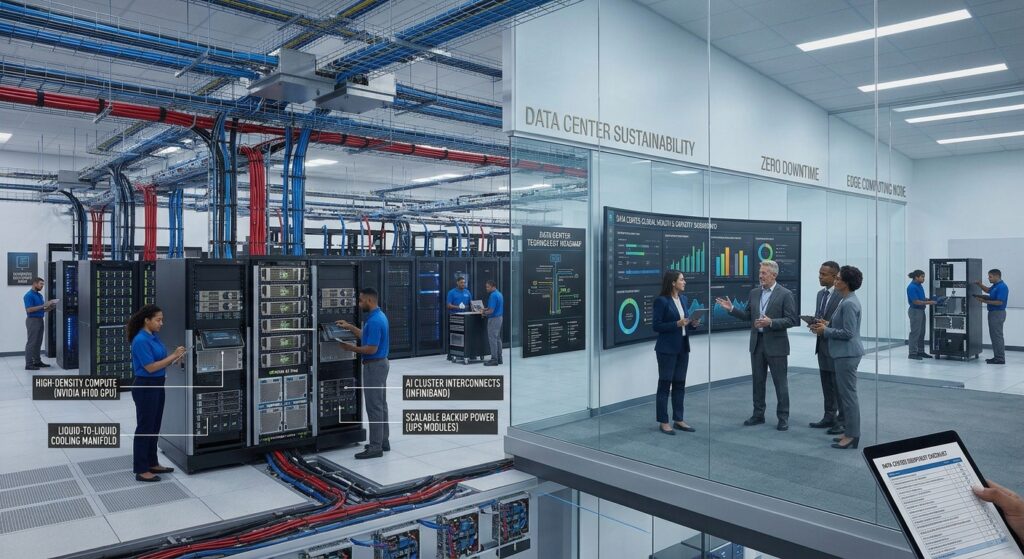
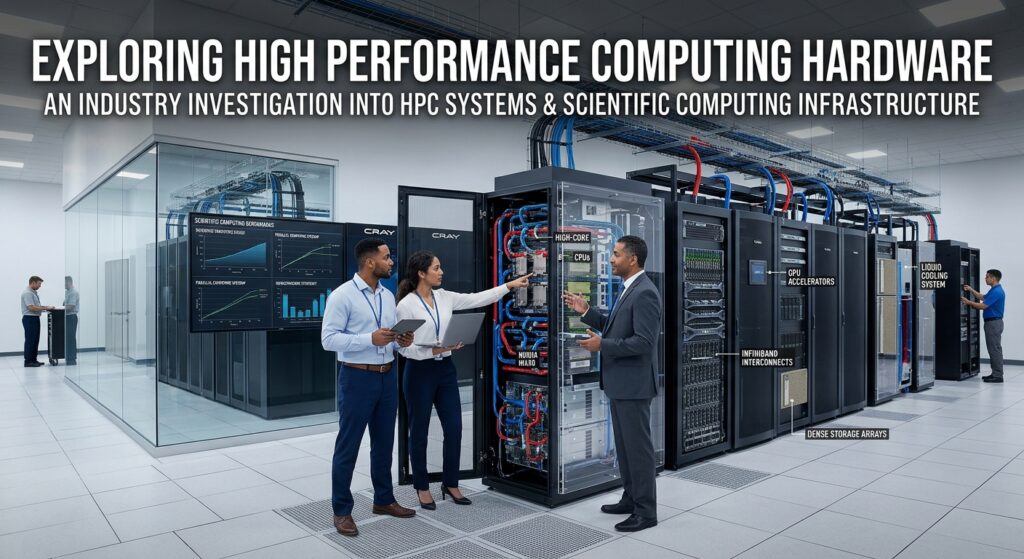
High performance computing hardware plays an essential role in solving complex computational problems across science, engineering, research, finance, and industrial operations. Organizations use high-performance computing (HPC) systems to process large datasets, perform advanced simulations, accelerate scientific discoveries, and execute calculations that would be difficult for conventional computers to handle efficiently.
Unlike traditional business servers, HPC infrastructure is designed to combine multiple computing resources through parallel processing. Depending on the workload, these systems may use powerful CPUs, GPU accelerators, high-bandwidth memory, specialized networking, and high-performance storage.
Choosing the right high performance computing hardware requires understanding how these components work together. A processor with many cores does not automatically deliver the best results if the application is limited by memory bandwidth, storage performance, or communication between computing nodes.
For organizations comparing HPC systems, the most effective purchasing approach is to evaluate application requirements, parallel processing capabilities, hardware architecture, scalability, energy consumption, and long-term infrastructure costs.
What Is High Performance Computing Hardware?
High performance computing hardware refers to specialized computing equipment designed to execute computationally demanding workloads using powerful processors, accelerators, memory systems, networking equipment, and storage infrastructure.
HPC systems commonly combine multiple servers into a computing cluster. Each server, known as a compute node, contributes processing resources to a larger computing environment.
Applications can distribute calculations across multiple processor cores, GPUs, or separate compute nodes, depending on their programming model and architecture.
Typical HPC applications include:
- Scientific research and numerical simulations
- Weather forecasting and climate modeling
- Computational fluid dynamics (CFD)
- Molecular dynamics and genomics
- Seismic processing and energy exploration
- Engineering and product design
- Financial modeling and risk analysis
- Computational physics and chemistry
- Artificial intelligence and scientific data analysis
The hardware requirements vary significantly between these applications.
For example, a computational fluid dynamics workload may depend heavily on CPU performance, memory bandwidth, and inter-node communication. A GPU-accelerated scientific application may benefit more from high-throughput accelerator hardware and sufficient GPU memory.
Therefore, HPC infrastructure should be designed around the actual application rather than selecting components based only on advertised specifications.
How HPC Systems Work
HPC systems combine multiple hardware resources to perform large computational tasks.
Instead of relying on one computer to complete every calculation, an HPC cluster can divide a workload into smaller tasks that execute across multiple computing resources.
A typical HPC infrastructure includes several major components.
1. Compute Nodes
Compute nodes are the servers responsible for executing computational workloads.
Each node typically contains:
- One or more processors
- System memory
- Local storage
- Network adapters
- Optional GPU accelerators
A cluster can contain multiple nodes with identical configurations or a mixture of different hardware platforms.
Organizations should choose node configurations according to application requirements and expected resource utilization.
2. Management and Login Nodes
Management and login nodes support administrative activities and user access.
They may handle:
- User authentication
- Software environment management
- Job submission
- Resource monitoring
- Cluster administration
- Job scheduling coordination
Separating management activities from intensive computing workloads can help maintain predictable cluster operations.
3. High-Speed Interconnect
The interconnect connects compute nodes and enables them to exchange data.
Communication speed and latency can significantly influence performance when an application distributes calculations across multiple servers.
High-performance interconnect technologies include InfiniBand and Ethernet-based solutions using technologies such as RDMA over Converged Ethernet (RoCE).
4. Storage Infrastructure
HPC storage provides the capacity and data throughput required by scientific applications.
Depending on the workload, storage may include local NVMe drives, shared storage systems, and parallel file systems.
A properly designed storage architecture helps multiple compute nodes access the required datasets efficiently.
5. Cluster Management Software
Cluster management software coordinates available computing resources and helps administrators manage workloads.
Job schedulers such as Slurm can allocate CPU cores, memory, and GPUs to submitted computational jobs.
Software management, monitoring, and resource scheduling are important parts of a complete HPC infrastructure.
Types of High Performance Computing Systems
Different HPC architectures are available for organizations with different computational requirements.
Understanding these architectures helps buyers determine which hardware platform is appropriate for their workloads.
1. CPU-Based HPC Systems
CPU-based HPC systems use powerful server processors to execute computational workloads.
They are common in scientific applications that depend on general-purpose processing, large memory capacity, and parallel CPU execution.
Potential applications include:
- Engineering simulations
- Computational chemistry
- Numerical modeling
- Scientific data processing
- Traditional parallel computing workloads
Common processor families for enterprise HPC infrastructure include Intel Xeon and AMD EPYC.
Important specifications include processor core count, clock frequency, memory channels, cache capacity, and supported memory configurations.
CPU-based systems may also be suitable for applications that have limited GPU support or depend on CPU-specific instruction sets.
2. GPU-Accelerated HPC Systems
GPU-accelerated HPC systems combine CPUs with specialized GPU processors.
GPUs can execute many operations simultaneously, making them useful for workloads that contain large amounts of parallel computation.
Common applications include:
- Computational physics
- Scientific simulations
- AI-assisted research
- Molecular modeling
- Numerical analysis
- Image and signal processing
GPU-accelerated servers may contain one or multiple accelerators, depending on their design.
When selecting GPU hardware, evaluate:
- GPU computing architecture
- FP64 and FP32 computational capabilities
- GPU memory capacity
- Memory bandwidth
- GPU-to-GPU communication
- PCIe or other accelerator connectivity
- Supported application frameworks
- Power and cooling requirements
Not every scientific application benefits from GPU acceleration. The software must be designed or optimized to use the available accelerator architecture effectively.
3. HPC Cluster Systems
HPC cluster systems connect multiple computing servers into a coordinated infrastructure.
Each node contributes processing and memory resources to the overall system.
Clusters are useful when a workload can be divided into tasks that run across multiple servers.
Common characteristics include:
- Multiple compute nodes
- High-speed networking
- Centralized or parallel storage
- Job scheduling software
- Cluster monitoring tools
- Shared software environments
Cluster design should consider how frequently computing nodes exchange information.
Applications that require frequent communication may need lower-latency networking than applications that process independent datasets.
4. Hybrid CPU and GPU Systems
Hybrid systems combine CPU and GPU computing resources.
The CPU typically handles general application operations, system coordination, and tasks that are not efficiently accelerated by the GPU.
The GPU handles suitable parallel computations.
This architecture is increasingly relevant for scientific computing and applications that combine traditional simulation with accelerated data processing.
Buyers should evaluate CPU-to-GPU balance, accelerator memory, communication bandwidth, and software compatibility.
5. Specialized Scientific Computing Systems
Some scientific and engineering applications require specific hardware configurations.
Examples include:
| System Type | Typical Applications |
|---|---|
| GPU Computing Servers | Accelerated simulations and scientific calculations |
| High-Memory Servers | Large datasets and memory-intensive workloads |
| CPU Compute Clusters | Parallel scientific processing |
| Storage-Optimized Systems | Data-intensive research |
| Liquid-Cooled HPC Systems | High-density computing infrastructure |
| Visualization Systems | Scientific visualization and rendering |
Specialized systems should be selected according to software requirements and workload characteristics.
Essential Components of High Performance Computing Hardware
An HPC system depends on more than processors. Its overall performance is influenced by the interaction between compute, memory, networking, storage, and cooling.
1. High-Performance CPUs
The CPU is responsible for executing instructions and managing many of the computational tasks performed by an HPC system.
Common enterprise processor families include:
- Intel Xeon
- AMD EPYC
When comparing processors, evaluate the following specifications.
Core Count
The number of processor cores determines the number of physical processing units available for parallel workloads.
Applications that scale efficiently across multiple CPU cores may benefit from processors with higher core counts.
However, additional cores do not automatically improve performance when applications are limited by memory bandwidth, synchronization, or serial processing sections.
Clock Frequency
Clock frequency influences how quickly processor cores execute instructions.
Some engineering and scientific applications may benefit from stronger per-core performance rather than simply adding more cores.
Memory Channels
Memory channels determine how data moves between system memory and the processor.
Applications that process large datasets may become memory-bandwidth limited, even when sufficient CPU cores are available.
Cache Capacity
Processor cache stores frequently accessed data close to the CPU.
Cache characteristics can influence performance in scientific applications that repeatedly access the same datasets or computation structures.
Processor Architecture
Architecture determines available instruction sets, memory capabilities, connectivity, and other platform features.
Buyers should verify compatibility with their compiler toolchains and computational software.
2. High-Bandwidth Memory and System RAM
Memory is a critical consideration in scientific computing systems.
HPC applications may process large datasets that must be accessed repeatedly during computation.
Insufficient memory capacity can prevent workloads from running efficiently, while limited memory bandwidth can restrict processor utilization.
Important memory specifications include:
- Total RAM capacity
- Memory generation
- Memory channels
- Supported data rates
- ECC support
- NUMA architecture
- DIMM configuration
- Maximum platform memory
ECC memory can help detect and correct certain memory errors and is commonly considered for enterprise computing environments.
High-Bandwidth Memory (HBM)
Some GPU accelerators and specialized computing processors use HBM technology.
HBM is designed to provide high memory bandwidth for suitable workloads.
It can be particularly relevant when accelerating large numerical computations and other applications that require frequent data movement.
Buyers should compare HBM capacity and bandwidth alongside GPU architecture and application requirements.
3. GPU Accelerators
GPU accelerators are important components in many modern HPC systems.
They can perform large numbers of parallel operations, particularly when software is designed to use their computing architecture.
Common accelerator platforms include:
- NVIDIA data center GPUs
- AMD Instinct accelerators
- Other specialized computing accelerators
GPU specifications should be evaluated using workload-specific requirements.
Important considerations include:
- Number of GPUs per server
- GPU memory capacity
- Memory bandwidth
- Supported precision formats
- GPU interconnect technology
- PCIe connectivity
- Accelerator power consumption
- Software and driver compatibility
For scientific applications, FP64 performance may be important because some numerical calculations require double-precision arithmetic.
For other workloads, different precision formats may provide a more appropriate balance of performance and accuracy.
Buyers should evaluate the numerical requirements of the application before comparing GPU specifications.
4. HPC Networking and Interconnect
Networking is one of the most important components of parallel computing hardware.
When multiple servers participate in the same computational task, they must exchange data.
Slow communication can reduce the benefits of adding additional compute nodes.
Important network characteristics include:
- Bandwidth
- Latency
- RDMA support
- Network adapter compatibility
- Switch architecture
- Network topology
- Cable and transceiver requirements
- Congestion management
InfiniBand
InfiniBand is a high-performance networking technology frequently used in HPC and other demanding data center environments.
It is designed to support low-latency and high-bandwidth communication between computing systems.
Ethernet and RoCE
Ethernet-based HPC networking can use RDMA over Converged Ethernet to support high-performance communication.
RoCE may be suitable for organizations building HPC infrastructure around Ethernet networking.
Actual performance depends on adapters, switches, configuration, congestion management, and the application.
Network Topology
Network topology determines how compute nodes and switches are interconnected.
Common cluster designs include:
- Fat-tree
- Dragonfly
- Other scalable network architectures
The appropriate topology depends on cluster size, communication patterns, scalability requirements, and budget.
5. High-Performance Storage Systems
HPC storage systems must support the data requirements of scientific and engineering workloads.
Some workloads need high storage capacity, while others require substantial read and write throughput.
Storage architecture may include:
NVMe Storage
NVMe drives provide high-performance solid-state storage using PCIe connectivity.
They can be suitable for local scratch storage, fast datasets, and applications requiring low storage latency.
Parallel File Systems
Parallel file systems distribute data across multiple storage devices or servers.
They allow multiple computing nodes to access shared data through coordinated input and output operations.
This architecture can be valuable for data-intensive HPC applications.
Network-Attached Storage
Network-attached storage provides centralized access to shared data.
Its suitability depends on throughput requirements, workload concurrency, and network architecture.
Storage Considerations
Before purchasing HPC storage hardware, review:
- Total usable capacity
- Read throughput
- Write throughput
- IOPS
- Metadata performance
- Storage network bandwidth
- Data protection
- Backup architecture
- Scalability
Storage should be tested using representative application workloads rather than capacity specifications alone.
6. Server Motherboards and PCIe Expansion
The motherboard determines processor compatibility, memory architecture, and supported expansion options.
For HPC deployments, available PCIe capacity can be particularly important.
GPU accelerators, network adapters, and storage controllers may all require expansion slots and sufficient connectivity.
Review:
- CPU socket configuration
- Memory slot availability
- PCIe generation
- Available PCIe lanes
- Accelerator compatibility
- Storage interfaces
- Remote management features
- Firmware support
A server designed for GPU workloads may require a different motherboard and chassis configuration from a conventional CPU-based compute node.
7. Power and Thermal Management
High-performance computing systems can consume substantial amounts of electricity and generate significant heat.
Thermal management must be considered during infrastructure planning.
Important specifications include:
- Server power requirements
- Power supply capacity
- Cooling fan configuration
- Airflow design
- Rack power distribution
- Facility cooling capacity
- GPU thermal requirements
- Operating temperature limits
Some high-density HPC systems use direct liquid cooling to manage heat more efficiently than conventional air cooling in suitable deployments.
Liquid cooling introduces additional facility requirements that should be reviewed before infrastructure installation.
High Performance Server Hardware: Key Specifications to Compare
Comparing high performance server hardware requires looking at the complete configuration.
The following table provides an evaluation framework for reviewing HPC system specifications.
| Specification | Important Evaluation Criteria |
|---|---|
| CPU | Model, core count, clock frequency and memory channels |
| GPU | Architecture, accelerator count and memory capacity |
| System RAM | Capacity, bandwidth and ECC support |
| HBM | Capacity and bandwidth, where applicable |
| Storage | NVMe, SSD, HDD or parallel storage |
| Networking | InfiniBand, Ethernet, RoCE and adapter capabilities |
| Interconnect | Latency, bandwidth and topology |
| PCIe | Expansion slots and supported generations |
| Power | System consumption and power supply capacity |
| Cooling | Air cooling or liquid cooling |
| Software | Compiler, MPI, driver and workload compatibility |
| Management | Monitoring, scheduling and remote administration |
A complete HPC specification sheet should also identify the exact hardware models and supported configurations.
Buyers should request manufacturer documentation and verified application benchmarks whenever possible.
Leading HPC Hardware Manufacturers and Platforms
Several manufacturers provide high performance computing hardware for scientific research, enterprise infrastructure, and data center applications.
The following platforms are useful starting points when building an HPC procurement shortlist.
1. Dell HPC Solutions
Dell provides server and infrastructure platforms that can be configured for HPC, AI, and data-intensive workloads.
Its HPC offerings combine computing servers, networking, storage, and software into different infrastructure designs.
Important evaluation areas include:
- PowerEdge server configurations
- CPU and accelerator options
- Networking architecture
- Storage integration
- Cluster management
- Validated workload designs
- Enterprise support services
Dell’s HPC infrastructure can be evaluated for both compute-focused workloads, such as modeling and simulation, and data-focused workloads.
Official website:
2. HPE Cray Supercomputing
HPE offers Cray supercomputing systems for demanding HPC and AI workloads.
Its portfolio includes large-scale computing architectures designed to support high-density computing and advanced data center infrastructure.
Evaluation considerations include:
- CPU and GPU architecture
- Compute density
- High-performance networking
- Storage architecture
- Liquid cooling options
- Cluster management
- System integration services
HPE Cray platforms may be relevant for organizations planning larger scientific computing environments or specialized supercomputing deployments.
Official website:
3. Lenovo ThinkSystem HPC
Lenovo ThinkSystem includes server platforms designed for HPC, AI, and other intensive computing workloads.
Its portfolio includes CPU-based systems, GPU-accelerated servers, and liquid-cooled infrastructure solutions.
Important evaluation considerations include:
- ThinkSystem server configurations
- AMD and Intel processor options
- GPU accelerator support
- Memory and storage architecture
- Lenovo Neptune cooling technologies
- Cluster deployment capabilities
- Infrastructure management
Lenovo provides multiple HPC system designs that can be evaluated for different performance, scalability, and energy requirements.
Official website:
4. NVIDIA Accelerated Computing Infrastructure
NVIDIA provides GPU accelerators, high-performance networking, and software technologies used in HPC and AI infrastructure.
Its computing ecosystem includes:
- Data center GPUs
- NVLink interconnect technology
- InfiniBand networking
- GPU software development tools
- Accelerated computing libraries
NVIDIA-based HPC systems can be relevant for workloads that benefit from GPU acceleration and supported parallel computing software.
Buyers should evaluate GPU memory, accelerator connectivity, application support, and total infrastructure costs.
Official website:
HPC Manufacturer Comparison
| Manufacturer | Platform | Main Evaluation Focus |
|---|---|---|
| Dell | HPC and PowerEdge | Flexible server, networking and storage architecture |
| HPE | Cray Supercomputing | Large-scale HPC infrastructure |
| Lenovo | ThinkSystem HPC | CPU, GPU and liquid-cooled server platforms |
| NVIDIA | Accelerated Computing | GPU acceleration and high-performance networking |
These platforms are not directly interchangeable in every deployment. The final selection depends on hardware configuration, software compatibility, workload benchmarks, support, and infrastructure requirements.
Parallel Computing Hardware and Performance Optimization
Parallel computing hardware is designed to divide computational tasks across multiple processing resources.
This can improve execution time when an application is capable of using multiple CPU cores, GPUs, or compute nodes efficiently.
However, the performance benefits of parallel computing depend heavily on application architecture.
Shared-Memory Parallel Computing
Shared-memory systems allow multiple CPU cores to access a common system memory space.
This architecture is commonly used in multi-core servers and parallel applications using programming frameworks such as OpenMP.
Important hardware considerations include:
- CPU core count
- Memory bandwidth
- Cache architecture
- Memory capacity
- NUMA configuration
Distributed-Memory Parallel Computing
Distributed-memory systems use multiple computers or server nodes connected through a network.
Each node has its own memory, and the application exchanges information between nodes through communication mechanisms such as MPI.
Important hardware considerations include:
- Number of compute nodes
- Processor configuration
- Network bandwidth
- Network latency
- Interconnect topology
- Memory capacity per node
Applications with frequent communication may be more sensitive to network latency than workloads that can process independent tasks.
GPU Parallel Computing
GPU computing distributes appropriate operations across many GPU processing units.
This architecture is useful when applications can organize calculations into workloads that map efficiently to the GPU programming model.
Important considerations include:
- GPU memory capacity
- Memory bandwidth
- Number of accelerators
- GPU-to-GPU connectivity
- CPU-to-GPU communication
- Software framework compatibility
The best architecture depends on the application’s parallel scalability and data movement requirements.
How to Choose the Right HPC Infrastructure
Selecting high performance computing hardware should begin with a clear understanding of the scientific or business workload.
The following steps can help organizations compare available HPC systems.
Step 1: Identify the Application Requirements
List the applications and computational tasks that the infrastructure must support.
Examples include:
- Computational fluid dynamics
- Molecular dynamics
- Weather simulation
- Seismic processing
- Finite element analysis
- Genomics
- Scientific visualization
- AI-assisted scientific computing
Review the applications’ published hardware requirements and recommended configurations.
Step 2: Determine CPU or GPU Priorities
Evaluate whether the application is designed for CPU computing, GPU acceleration, or a hybrid architecture.
Do not assume that every HPC application benefits from GPUs.
Compare actual application performance using relevant benchmarks.
Step 3: Determine Memory Requirements
Estimate the memory requirements of representative workloads.
Review system RAM capacity, memory bandwidth, NUMA architecture, and GPU memory capacity where applicable.
The correct memory configuration should support the application without unnecessary resource shortages.
Step 4: Evaluate Networking and Interconnect
Determine how frequently compute nodes need to exchange data.
Applications using distributed-memory parallel computing may require high-bandwidth, low-latency networking.
Compare available InfiniBand and Ethernet-based options according to application requirements and infrastructure compatibility.
Step 5: Evaluate Storage Architecture
Estimate dataset sizes, read and write patterns, checkpoint requirements, and expected simultaneous access.
Consider local NVMe storage, shared storage, and parallel file system technologies.
Step 6: Plan Power and Cooling
Estimate total system power consumption and cooling requirements.
GPU-dense servers may require specialized power distribution and thermal management.
The data center must support the expected rack density and cooling architecture.
Step 7: Test the Complete System
Whenever possible, evaluate hardware using benchmarks or pilot applications that represent real production workloads.
Performance testing should consider:
- Application execution time
- Scaling efficiency
- Memory bandwidth
- Network communication
- Storage throughput
- Energy consumption
- Overall system utilization
Testing the full system is more meaningful than comparing individual component specifications.
Understanding HPC Benchmarks
HPC benchmarks help organizations compare different computing configurations.
However, benchmarks measure different aspects of system performance.
Some focus on floating-point computing, while others evaluate memory access, network communication, or application-specific performance.
Examples include:
SPEChpc
SPEChpc benchmarks evaluate compute-intensive parallel performance across one or more nodes.
Its evaluation includes processors, optional accelerators, memory, interconnects, compilers, and MPI implementations.
HPL
High Performance Linpack evaluates floating-point performance for solving dense linear systems.
It is commonly associated with supercomputer performance comparisons.
HPC Application Benchmarks
Application-specific benchmarks measure how a system performs with actual scientific or engineering workloads.
These can be more relevant to procurement decisions when the benchmark closely represents the intended application.
Businesses should avoid selecting HPC hardware based on one benchmark number alone.
The most useful benchmark is one that represents the workloads the organization expects to run.
Total Cost of Ownership for HPC Infrastructure
High performance computing hardware involves substantial infrastructure and operational considerations.
The initial server purchase is only one part of the total cost of ownership (TCO).
Important cost categories include:
| Cost Category | Items to Consider |
|---|---|
| Compute Hardware | CPUs, GPUs and server chassis |
| Memory | System RAM and accelerator memory |
| Networking | NICs, switches, transceivers and cabling |
| Storage | NVMe, shared storage and parallel file systems |
| Power | Electricity and power distribution |
| Cooling | Air cooling or liquid cooling infrastructure |
| Software | Operating systems, compilers and application licenses |
| Maintenance | Hardware replacement and support |
| Infrastructure | Racks, data center space and facility equipment |
| Operations | Administration, monitoring and system management |
Energy consumption can be particularly important for large HPC clusters because many servers may operate simultaneously.
Organizations should compare performance per watt, cooling requirements, infrastructure utilization, and long-term maintenance expenses.
A higher-performing server may provide better economic value when it completes workloads faster or reduces the total number of systems required.
However, this must be evaluated using representative measurements rather than assumptions based on specifications alone.
Common Mistakes When Choosing High Performance Computing Hardware
Selecting HPC hardware without understanding application requirements can result in expensive systems that fail to deliver the expected performance.
1. Choosing CPUs Based Only on Core Count
More CPU cores do not always result in faster scientific computing.
Performance also depends on memory bandwidth, application scalability, processor architecture, and communication overhead.
2. Purchasing GPUs Without Checking Software Compatibility
GPU hardware may not accelerate applications that lack suitable GPU support.
Verify programming frameworks, supported libraries, drivers, and application versions before selecting accelerators.
3. Ignoring Memory Bandwidth
Some scientific applications are limited by how quickly data can move between memory and processors.
Memory capacity alone is not enough to determine system suitability.
4. Underestimating Network Requirements
Multi-node applications may spend significant time exchanging data between compute nodes.
A suitable high-speed interconnect can be an important part of the overall system design.
5. Overlooking Storage Performance
Large storage capacity does not necessarily guarantee fast application execution.
Evaluate storage throughput, metadata performance, concurrency, and access patterns.
6. Ignoring Power and Cooling
High-density CPU and GPU systems can create substantial thermal and electrical demands.
Infrastructure planning should account for both server-level and facility-level requirements.
7. Comparing Systems Using Unrelated Benchmarks
A benchmark designed for one workload may not predict performance for another application.
Use representative applications and consistent measurement conditions whenever possible.
Conclusion
High performance computing hardware provides the foundation for scientific research, engineering simulations, large-scale data analysis, and other computationally demanding workloads.
Selecting the right HPC system requires evaluating processors, GPU accelerators, memory bandwidth, storage architecture, networking, power, and cooling as a complete infrastructure solution.
CPU-based systems, GPU-accelerated servers, and multi-node HPC clusters each serve different computing requirements.
Organizations comparing HPC systems should begin by understanding their applications, examining parallel scalability, reviewing supported hardware configurations, and measuring performance through relevant benchmarks.
Dell, HPE, Lenovo, and NVIDIA provide platforms and technologies that can form part of an HPC procurement shortlist.
The best choice is not necessarily the system with the highest advertised processor or GPU specifications. It is the system that delivers the appropriate application performance, scalability, software compatibility, and total cost of ownership for the organization’s requirements.
Frequently Asked Questions
1. What is high performance computing hardware?
High performance computing hardware refers to specialized computing equipment designed to process complex workloads using powerful CPUs, GPU accelerators, memory systems, storage, and high-speed networking.
2. What are the main components of an HPC system?
The main components include compute nodes, CPUs, GPUs, system memory, interconnects, storage infrastructure, management nodes, and cluster scheduling software.
3. What is the difference between HPC and traditional servers?
Traditional servers commonly support business applications and infrastructure services. HPC systems are designed to execute computationally demanding workloads through parallel processing across multiple processors, accelerators, or computing nodes.
4. Are GPUs necessary for high performance computing?
No. Some HPC applications rely primarily on CPUs, while others benefit from GPU acceleration. The correct architecture depends on software support and workload characteristics.
5. What processors are used in HPC systems?
Common enterprise processor families include Intel Xeon and AMD EPYC. Specialized platforms may also use other processor architectures depending on the application and system design.
6. Why is memory bandwidth important in HPC?
Memory bandwidth determines how quickly processors can access system memory. Scientific applications that process large datasets may become limited by memory bandwidth even when substantial CPU resources are available.
7. What networking technologies are used in HPC clusters?
HPC clusters may use InfiniBand or high-performance Ethernet technologies, including RoCE. The appropriate network depends on communication requirements, system architecture, and workload characteristics.
8. What is a parallel file system in HPC?
A parallel file system distributes data across multiple storage resources and allows multiple clients to access data concurrently. It is useful for data-intensive workloads that require scalable storage throughput.
9. What is the difference between CPU-based and GPU-based HPC?
CPU-based systems rely on general-purpose processor cores, while GPU-based systems use specialized accelerators to execute suitable parallel workloads. Hybrid systems combine both architectures.
10. Which companies provide high performance computing systems?
Dell, Hewlett Packard Enterprise, Lenovo, and NVIDIA offer server platforms, computing accelerators, networking, or infrastructure technologies used in HPC environments.
11. How do businesses compare HPC hardware performance?
Businesses should evaluate representative application benchmarks, processor performance, memory bandwidth, network latency, storage throughput, scalability, power consumption, and software compatibility.
12. What industries use HPC infrastructure?
HPC infrastructure is used in scientific research, engineering, energy exploration, weather modeling, healthcare research, financial analysis, manufacturing, and other computationally intensive industries.
Sources and References
- Intel – High Performance Computing Architecture: https://www.intel.com/content/www/us/en/high-performance-computing/hpc-architecture.html
- Microsoft – High Performance Computing on Azure: https://learn.microsoft.com/azure/architecture/guide/compute/high-performance-computing
- HPE – Cray Supercomputing: https://www.hpe.com/us/en/products/supercomputing/cray.html
- Dell – Validated Design for Government HPC, AI and Data Analytics: https://www.dell.com/en-us/infohub/articles/dell-validated-design-for-government-hpc-artificial-intelligence-and-data-analytics
- Lenovo – High Performance Computing Solutions: https://www.lenovo.com/us/en/data-center/solutions/hpc
- NVIDIA – InfiniBand Networking Solutions: https://www.nvidia.com/en-us/networking/products/infiniband/
- Google Cloud – Parallel File Systems for HPC Workloads: https://docs.cloud.google.com/architecture/parallel-file-systems-for-hpc
- SPEC – SPEChpc 2021 Benchmark Overview: https://www.spec.org/hpc2021/Docs/overview.html
- Lawrence Livermore National Laboratory – Slurm User Manual: https://hpc.llnl.gov/banks-jobs/running-jobs/slurm-user-manual
- Puget Systems – Hardware Recommendations for Scientific Computing: https://www.pugetsystems.com/solutions/high-performance-computing/scientific-computing/hardware-recommendations/